
Depth-aware post effects
Depth-edge SMAA, screen-space ambient occlusion, cinematic depth of field and related passes when depth is available in single-player contexts.
Injector · Direct3D · OpenGL · Vulkan
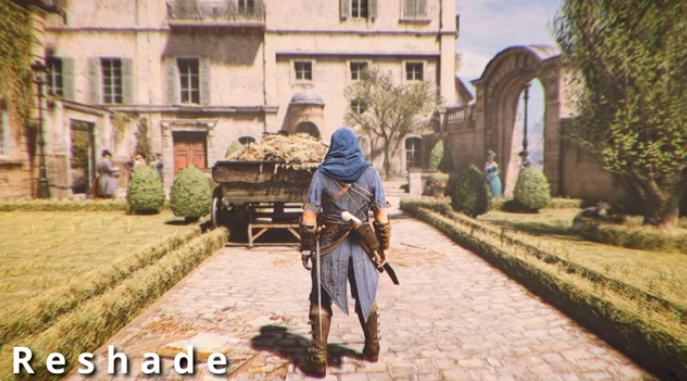
ReShade sits between a finished frame and the display, so you can run ambient occlusion, depth of field, SMAA, grading and more on titles that never shipped those tools. It is free under BSD 3-Clause, authored by crosire, and works across Direct3D 9-12, OpenGL and Vulkan on Windows.
Overview
A generic injector by crosire that exposes frame color and depth so effects can run on top of almost any supported renderer.
Think of a favorite single-player title with screen-space ambient occlusion, real depth of field, chromatic aberration, film grain, saturation and color correction, cross processing or multi-pass blur. ReShade gives you that toolkit without waiting for an engine patch.
*.ini files from the overlay. Do not redistribute binaries or shader packs.Render path
Pick a stage to see how typical ReShade techniques sit between the game frame and the presented image.
Pass detail
ReShade hooks the present path so each frame’s color (and optionally depth) can feed a chain of ReShade FX techniques before the image reaches the display.
Stack order is illustrative · Enable only the techniques you need
Capabilities
Core pieces of the ReShade toolkit, taken from how the product actually works.
Depth-edge SMAA, screen-space ambient occlusion, cinematic depth of field and related passes when depth is available in single-player contexts.
Chromatic aberration, dynamic film grain, automatic saturation, color correction, cross processing and multi-pass blur from bundled and community shaders.
Write ReShade FX once. The runtime targets the correct shader model and language for Direct3D, OpenGL or Vulkan.
Who uses it
Classic-game players, virtual photographers and shader authors - audiences already documented on product pages.
Add antialiasing, occlusion and grading when the original engine stopped shipping updates years ago.
Packages such as OtisFX Cinematic DOF target virtual photography workflows installed through the setup tool.
Author once in ReShade FX and ship techniques that run on D3D, OpenGL and Vulkan targets.
Category context
Concrete criteria - not slogans. Values reflect documented ReShade behavior versus typical category limits.
| Criterion | ReShade | GPU vendor filters | In-engine post only |
|---|---|---|---|
| Graphics APIs | D3D9-12, OpenGL, Vulkan | Vendor stack dependent | Whatever the game ships |
| Custom shaders | ReShade FX + community packs | Preset filters, limited authoring | Rarely user-editable |
| Depth effects | Yes in SP; auto-off in multiplayer | Usually color-only | Engine-defined |
| License | BSD 3-Clause, open source since 2017 | Closed driver feature | Game license |
| Preset sharing | *.ini from the overlay UI |
Account or local profiles | Usually none |
Transparency
Before you install an injector, these are the facts that usually decide whether the download is worth trusting.
Trust & security detailsFrom players
Composite notes based on common Uptodown, TechSpot and forum themes. Hover the strip to pause.
“SMAA plus a mild LumaSharpen preset made an older DX9 RPG readable again on a 1440p monitor. Setup took one run of the tool.”
Single-player RPG · Windows 11
“Cinematic DOF from OtisFX is great for screenshots. Performance Mode helps, but stacking five heavy effects still costs frames on my 1660.”
Virtual photography · mid-range GPU
“Windows Defender flagged the new build for a day until definitions caught up. Hash matched the listing, so I restored the exe from quarantine.”
Security-conscious install
“Sharing only the .ini preset kept friends on the same look without shipping DLLs. That rule from the download notes is worth following.”
Preset sharing
“Afterburner conflicted until I closed RTSS. After that, Vulkan titles loaded the overlay normally.”
Overlay conflict report
Quick answers
Short versions. Fuller explanations live on the FAQ page.
Get the build
Installer about 3.89 MB. Confirm system requirements and integrity notes on the download page before you run setup.
Released Aug 2, 2026 · BSD 3-Clause · Windows